Geocoding Engine
Geocoding, reverse geocoding, autocomplete and nearby search
Geocoding Engine
Search, Autocomplete, Reverse and Places APIs
Geocoding engine is the full stack of location-based searches. It offers comprehensive location search, autocomplete, reverse geocoding and places APIs from too many sources of the world such as OSM, Open Addresses, Geonames, Placeholder coarse geocoding, Whos on First etc. Its absolute beauty is it can geocode custom data through a structured CSV.
For more documentation and endpoints go to Documentation and Endpoint pages

Discover all the Search or Geocoding, Autocomplete & Places APIs and Endpoints
Search & Geocoding Engine Endpoints
1. Search or Forward Geocoding API- {domain:port}/v1/search?text=hospital&size=25&focus.point.lon={{lon}}&focus.point.lat={{lat}}&sources=osm&categories=health&layers=venue
- Search API Test
2. Reverse Geocoding API- {domain:port}/v1/reverse?point.lat={{lat}}&point.lon={{lon}}&size=5&boundary.country=LU&boundary.gid=whosonfirst:region:1745977427&sources=osm&layers=address
- Reverse Geocoding API Test
3. Autocomplete API- {domain:port}/v1/autocomplete?text=Hosp&size=10&sources=osm&layers=venue&focus.point.lat={{lat}}&focus.point.lon={{lon}}
- Autocomplete API Test
4. Structured Search API- {domain:port}/v1/reverse?point.lat={lu_lat}&point.lon={lu_lon}&size=5&boundary.country=LU&boundary.gid=whosonfirst:region:1745977427&sources=osm&layers=address
- Structured Search API Test
5. Place API- {domain:port}/v1/reverse?point.lat={lu_lat}&point.lon={lu_lon}&size=5&boundary.country=LU&boundary.gid=whosonfirst:region:1745977427&sources=osm&layers=address
- Place API test
TEST ALL GEOCODING API...

Test the Geocoding Engine Endpoints live
Stand-alone Geocoding Engine
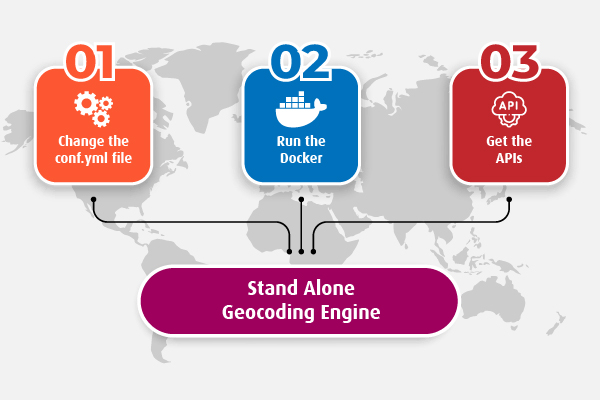
LocusQ Master stack covers all the segments of web GIS such as maps, routing, direction, transit, geocoding and many more APIs. Besides this, Geocoding Engine can be installed as a stand-alone service if anyone does not need few other services or only 2-3 services. Here is the steps
-
Change the
conf.ymlfileChange the configuration file according to your needs. Country-wise configuration code can be found here
-
Run the standalone Geocoding Engine Docker
Pull or run directly the Geocoding Engine docker image keeping the
conf.ymlfile in the same directory from where the docker is runningdocker run -it --name geocoding-engine --network locusq -v $(pwd):/data -p 4703:3100 locusq/geocoding-engine:latest -
Get the APIs
Wait a few minutes and check the status of service readiness with the following command
docker exec -it geocoding-engine status
When the service is ready, to get the APIs visit the Geocoding API endpoints.