Map Designing Tool
A tool to re-design the theme of the maps and implement it with LocusQ
Map design Tool
Design the Map Theme
Map Design tool is based on the editor of Maputnik. This Map Design tool is built on the map deployed with the Map Engine. Change map theme according to your needs, upload it to the Map Engine and restart the `Map Engine`. Be careful about the sources, glyphs and sprite links. If you want to change the Glyphs (fonts) and Sprite please read the documentation of Glyphs and Sprites
For more documentation and endpoints go to Documentation of Map Design tool page.
Test the Map Design tool live
Stand-alone Geocoding Engine
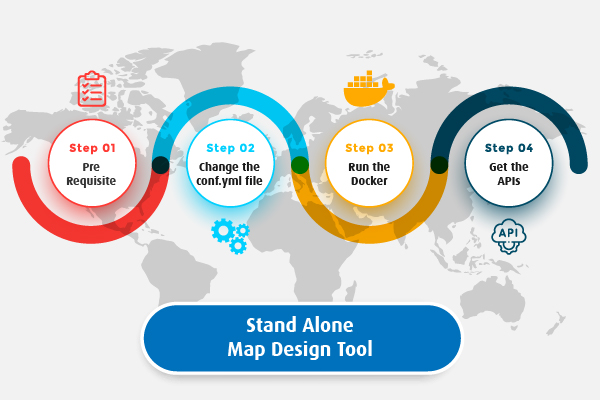
LocusQ Master stack covers all the segments of web GIS such as maps, routing, direction, transit, geocoding and many more tools. Besides this, Map Design Tool can be installed as a stand-alone service if anyone does not need few other services or only 2-3 services. Here are the steps
-
Pre-requisite
The map design tool is based on
Map Engine. So theMap Engineis needed to start prior to run Map Design tool. -
Change the
conf.ymlfileChange the configuration file according to your needs. Country-wise configuration code can be found here. Use docker network
hostand map engineport -
Run the standalone Map Design Docker
Pull or run directly the Map Design docker image keeping the
conf.ymlfile in the same directory from where the docker is runningdocker run -it --name map-design --network locusq -v $(pwd):/data -p 4708:8888 locusq/map-design:latest -
Get the APIs
Wait a few minutes and check the status of service readiness with the following command
docker exec -it map-design status
When the service is ready, to get the APIs visit the Map API endpoints.