Routing & Direction
Routing, direction, navigation, isochrones and many more
3 different Routing Engine solution
LocusQ offers three different routing solutions for different purposes and different abilities. We recommend using anyone from these three routing engines based on the use cases
Routing Engine
Routing Engine
This routing engine is based on OSRM and it is a powerful routing engine that offers basic routing to complex travelling sales person (TSP) solution to isochrones but for the turn by turn direction that is used for navigation depends on another tool called OSRM turn by turn direction which can be used in the front end. Besides this, it can perform a heavy-duty routing.
For more documentation and endpoints go to Documentation and Endpoint pages of OSRM Routing

Discover all the Routing APIs and Endpoints
Routing Engine Endpoints
1. Simple Routing API- {domain:port}/route/v1/driving/{{from_lon}},{{from_lat}};{{to_lon}},{{to_lat}}?alternatives=true&steps=true&annotations=true&geometries=polyline&overview=full
- Simple Routing API Test
2. Nearest POI API- {domain:port}/nearest/v1/driving/{{lu_lon}},{{lu_lat}}?number=3&bearings=0,20
- Nearest POI API Test
3. Routing Table API- {domain:port}/table/v1/driving/{{from_lon}},{{from_lat}};{{lon}},{{lat}};{{to_lon}},{{to_lat}}number=3&bearings=0,20
- Routing table API Test
4. Map Matching API- {domain:port}/match/v1/driving/{{gps_coordinates}}?steps=true&geometries=polyline&overview=full&annotations=true
5. Nearest POI API- {domain:port}/trip/v1/driving/{{coordinates}}?steps=true&geometries=polyline&overview=full&annotations=true
- Trip API Test
TEST ALL ROUTING API...

Stand-alone Routing Engine
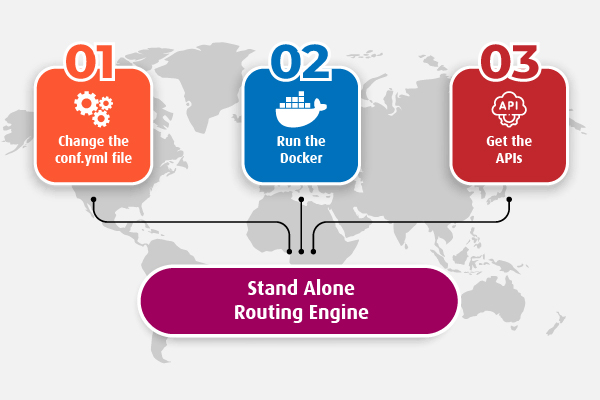
LocusQ Master stack covers all the segments of web GIS such as maps, routing, direction, transit, geocoding and many more APIs. Besides this, Routing Engine can be installed as a stand-alone service if anyone does not need few other services or only 2-3 services. Hee is the steps
-
Change the
conf.ymlfileChange the configuration file according to your needs. Country-wise configuration code can be found here
-
Run the standalone Routing Engine Docker
Pull or run directly the Routing Engine docker image keeping the
conf.ymlfile in the same directory from where the docker is runningdocker run -it --name routing-engine --network locusq -v $(pwd):/data -p 4704:5000 locusq/routing-engine:latest -
Get the APIs
Wait a few minutes and check the status of service readiness with the following command
docker exec -it routing-engine status
When the service is ready, to get the APIs visit the Routing API endpoints.
Test the Routing Engine Endpoints live
Routing Engine
Routing and Direction Engine
This routing engine is based on Valhalla and offers almost a complete package for Routing except for its GTFS data dependency on TransitLand. Besides the transit solution, it offers a powerful and comprehensive solution for routing with turn-by-turn direction built in the API which is also ready to use speech declaration for navigation. It also provides TSP solution, isochrone, routing matrix etc.
For more documentation and endpoints go to Documentation and Endpoint pages of Valhalla Routing

Discover all the Route Direction APIs and Endpoints
Routing & Direction Engine Endpoints
1. Simple Routing with direction API- {domain:port}/route?json={"locations":[{"lat":{{from_lat}},"lon":{{from_lon}}},{"lat":{{to_lat}},"lon":{{lto_lon}}}],"costing":"auto","units":"km"}
- Simple Routing with Direction API Test
2. Optimized Route API- {domain:port}/optimized_route?json={"locations":[{"lat":{{from_lat}},"lon":{{from_lon}}},{"lat":{{via_lat}},"lon":{{via_lon}}},{"lat":{{lto_lat}},"lon":{{to_lon}}}],"costing":"auto","units":"km"}
- Optimized API Test
3. Sources to Targets API- {domain:port}/sources_to_targets?json={"sources":[{"lat":{{source_lat}},"lon":{{source_lon}}}],"targets":[{"lat":{{target_1_lat}},"lon":{{target_1_lon}}},{"lat":{{target_2_lat}},"lon":{{target_2_lon}}}],"costing":"auto","units":"km"}
- Sources to Targets API Test
4. Isochrone API- {domain:port}/isochrone?json={"locations":[{"lat":{{lat}},"lon":{{lon}}}],"costing":"auto","contours":[{"time":5,"color":"123456"},{"time":10,"color":"345216"},{"time":15,"color":"ff0000"}],"polygons":"true"}
- Isochrone API Test
5. Locate API- {domain:port}/locate?json={"verbose":true,"locations":[{"lat":{{lat}},"lon":{{lon}}},{"lat":{{lat}},"lon":{{lon}}},{"lat":{{lat}},"lon":{{lon}}}],"costing":"bicycle","costing_options":{"bicycle":{"bicycle_type":"road"}},"directions_options":{"units":"miles"},"id":"12abc3afe23984fe"}
- Locate API Test
TEST ALL ROUTE DIRECTION API...

Stand-alone Routing & Direction Engine
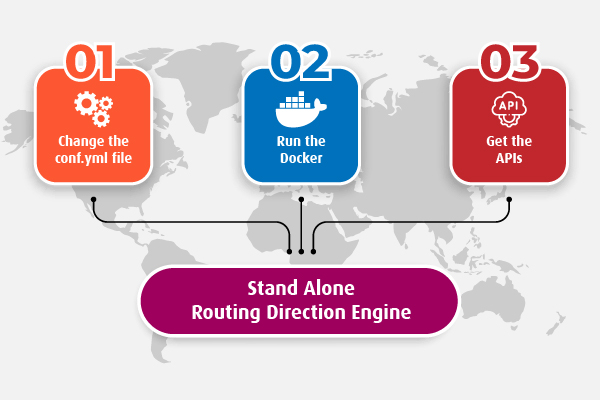
LocusQ Master stack covers all the segments of web GIS such as maps, routing, direction, transit, geocoding and many more APIs. Besides this, Routing and Direction Engine can be installed as a stand-alone service if anyone does not need few other services or only 2-3 services. Hee is the steps
-
Change the
conf.ymlfileChange the configuration file according to your needs. Country-wise configuration code can be found here
-
Run the standalone Routing & Direction Engine Docker
Pull or run directly the Routing & Direction Engine docker image keeping the
conf.ymlfile in the same directory from where the docker is runningdocker run -it --name routing-direction-engine --network locusq -v $(pwd):/data -p 4705:8002 locusq/routing-direction-engine:latest -
Get the APIs
Wait a few minutes and check the status of service readiness with the following command
docker exec -it routing-direction-engine status
When the service is ready, to get the APIs visit the Geocoding API endpoints.
Test the Routing & Direction Endpoints live
Routing Engine
Routing & Transit (Multimodal) Engine
This routing enge is based on Graphhopper and it is a full package of Routing services with a blazing-fast response with transit or multimodal routing. It can even use custom GTFS format data for multimodal routing. TRansit/GTFS data can be found in OpenMobilityData of Transitfeed.com.
For more documentation and endpoints go to Documentation and Endpoint pages of Graphhopper Routing

Discover all the Transit or Multimodal Routing APIs and Endpoints
Routing & Transit Engine Endpoints
1. Simple Routing API- {domain:port}/route?point={{from_lat}},{{from_lon}}&point={{to_lat}},{{to_lon}}&vehicle=car&points_encoded=true&debug=true&details=average_speed&details=time&instructions=true&weighting=fastest&ch.disable=true
- Simple Routing API Test
2. Optimized Routing API- {domain:port}/vrp?point={{from_lat}},{{from_lon}}&point={{via_lat}},{{via_lon}}int={{to_lat}},{{to_lon}}&vehicles=car&points_encoded=true&debug=true&details=average_speed&details=time&instructions=true
- Optimized Routing API Test
3. Isochrone API- {domain:port}/isochrone?point={{lat}},{{lon}}&time_limit=600&vehicle=car&buckets=3&reverse_flow=false
- Isochrone API Test
4. Route Matrix API- {domain:port}/vrp?point={{from_lat}},{{from_lon}}&point={{via_lat}},{{via_lon}}&point={{to_lat}},{{to_lon}}&vehicles=car&points_encoded=true&debug=true&details=average_speed&details=time&instructions=true
TEST ALL ROUTE TRANSIT API...
Stand-alone Geocoding Engine
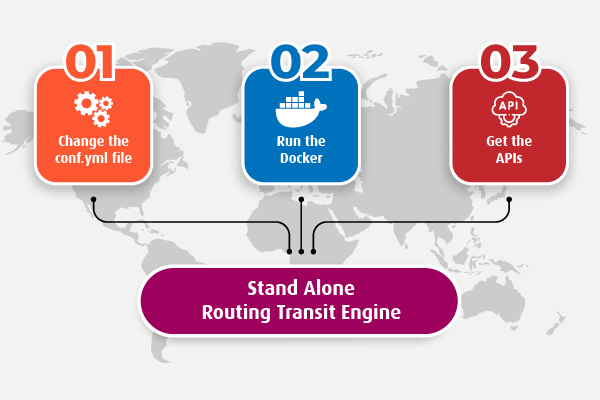
LocusQ Master stack covers all the segments of web GIS such as maps, routing, direction, transit, geocoding and many more APIs. Besides this, Geocoding Engine can be installed as a stand-alone service if anyone does not need few other services or only 2-3 services. Hee is the steps
-
Change the
conf.ymlfileChange the configuration file according to your needs. Country-wise configuration code can be found here
-
Run the standalone Geocoding Engine Docker
Pull or run directly the Routing & Transit Engine docker image keeping the
conf.ymlfile in the same directory from where the docker is runningdocker run -it --name routing-transit-engine --network locusq -v $(pwd):/data -p 4706:8989 locusq/routing-transit-engine:latest -
Get the APIs
Wait a few minutes and check the status of service readiness with the following command
docker exec -it routing-transit-engine status
When the service is ready, to get the APIs visit the Geocoding API endpoints.